Key points
- Solmex ranks first: it is the only one of the seven whose pricing page lists fuel management and work permits, and its plan with purchase orders costs USD 35 per user a month.
- Three of the seven have a free plan you can keep: Solmex, MaintainX and Fiix. UpKeep offers a trial.
- Limble, eMaint and Fracttal do not print a price on their pricing pages; you get a figure from a calculator or a sales quote.
- Before you choose, count your users and the people who only report problems. Most of these tools let requesters in free, so the bill depends on the first number.
The ranking at a glance
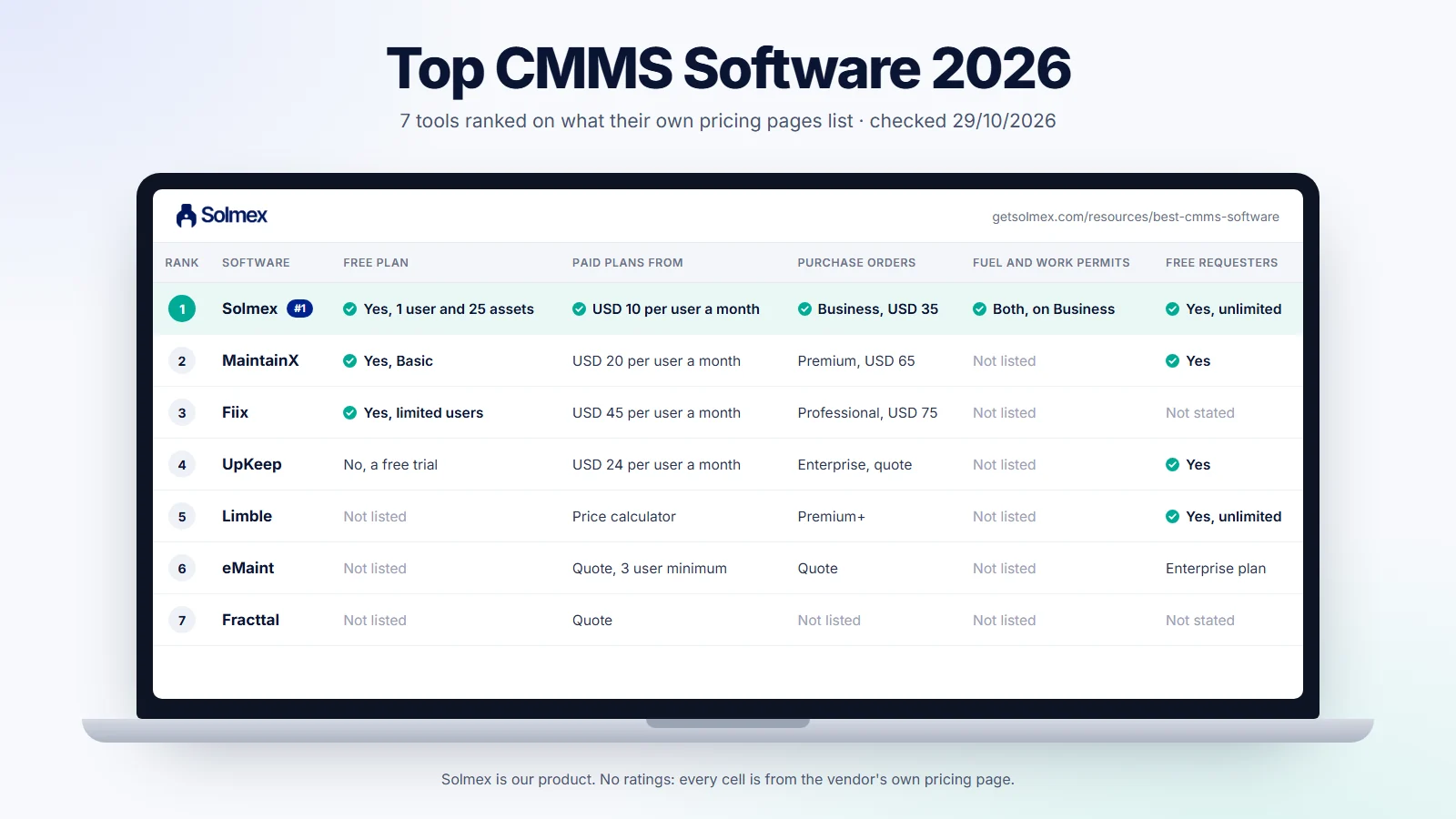
| Software | Free plan | Paid plans from | Purchase orders | Fuel and work permits | Free requesters |
|---|---|---|---|---|---|
| 1. Solmex | Yes, 1 user and 25 assets | USD 10 per user a month | Business, USD 35 | Both, on Business | Yes, unlimited |
| 2. MaintainX | Yes, Basic | USD 20 per user a month | Premium, USD 65 | Not listed | Yes |
| 3. Fiix | Yes, limited users | USD 45 per user a month | Professional, USD 75 | Not listed | Not stated |
| 4. UpKeep | No, a free trial | USD 24 per user a month | Enterprise, quote | Not listed | Yes |
| 5. Limble | Not listed | Price calculator | Premium+ | Not listed | Yes, unlimited |
| 6. eMaint | Not listed | Quote, 3 user minimum | Quote | Not listed | Enterprise plan |
| 7. Fracttal | Not listed | Quote | Not listed | Not listed | Not stated |
Pros and cons at a glance
Who each tool suits, and the one pro and one con that matter most. The full lists are in each review below.
| Software | Best for | Biggest pro | Biggest con |
|---|---|---|---|
| 1. Solmex | Maintenance, parts, purchasing, fuel and permits in one system, starting free | The only one listing fuel and work permits, with purchase orders at USD 35 | In English and Turkish only |
| 2. MaintainX | A free, mobile-first work order app | Free plan with unlimited work orders and requesters | Parts and purchase orders need Premium, USD 65 |
| 3. Fiix | Parts inventory on a free plan | Free plan includes parts inventory | Highest published entry price, USD 45 |
| 4. UpKeep | A low entry price and a trial first | Published entry price of USD 24 | No free plan; purchase orders on Enterprise only, by quote |
| 5. Limble | Unlimited preventive maintenance and requesters | Unlimited work requesters on every plan | No price printed on its pricing page |
| 6. eMaint | Condition-based work on an annual contract | Purchasing and meter readings on its first plan | Quote only, prepaid annually, 3 user minimum |
| 7. Fracttal | Asset monitoring with IoT connections | Asset monitoring and an offline mobile app | No plans or prices listed |
How we ranked them
Most "best CMMS" lists rank by review scores or by features nobody can check. This one uses only what each vendor publishes about itself, in this order of weight:
- Coverage. How much of a maintenance operation the published plans list: work orders, preventive maintenance, spare parts and purchasing, and the work around them, such as fuel, work permits, routine jobs and workforce records.
- A published price. Whether you can see what it costs before talking to sales, and what the plan with purchasing costs.
- A free way to start. A plan you can keep using without paying, not only a trial.
- Free requesters. Whether people who only report a problem need a paid licence.
The pros and cons come from the same pages. A pro is something a plan includes; a con is something the page puts on a higher plan, behind a quote, or does not list at all. Solmex gets cons too.
There are no ratings on this page. Review scores depend on who was asked and when, and a ranking that quotes them cannot be checked by the reader.
1. Solmex
Solmex is a CMMS and asset management system for plants, buildings, sites and equipment, in English and Turkish. Beyond work orders and preventive maintenance, its plans include the work maintenance teams usually keep in separate spreadsheets: routine daily jobs, fuel, work permits, workforce records, tools and purchasing, all on the same asset record.
Best for: teams that want work orders, preventive maintenance, parts, purchasing, fuel and work permits in one system, starting free.
What its pricing page lists
- Starter, free forever: one full user and up to 25 assets on one site, with work orders, breakdowns, work requests and QR labels.
- Growth, USD 10 per full user a month billed annually: preventive maintenance by hours, kilometres or the calendar, inspections with signed PDFs, and routine jobs. Up to 50 assets across three sites.
- Business, USD 35 per full user a month billed annually: spare parts, purchase orders with an approval rule, fuel, work permits, costs, workforce and reports, with no asset or site limit.
- People who only report problems are free and unlimited on every plan, and need no account: they scan a QR code on the asset.
Solmex pros
- The only one of the seven whose pricing page lists fuel management and work permits, beside work orders, preventive maintenance, parts and purchasing.
- Purchase orders with an approval rule at USD 35 per user a month: the lowest published price for a plan with purchasing on this list.
- The lowest published paid price on this list: USD 10 per user a month for Growth, with preventive maintenance by hours, kilometres or the calendar.
- A free plan you keep, not a trial: work orders, breakdowns, work requests and QR labels for one full user and 25 assets.
- People who report problems are free and unlimited on every plan, and need no account: they scan the QR code on the asset.
- Everything sits on the same asset record: work orders, services, inspections, fuel, parts and costs, so an asset's history is one page.
Solmex cons
- The app is in English and Turkish only, so a team that works in another language uses it in English.
- The free plan is one full user on one site: a second planner or a second site means moving to Growth.
Source: Solmex pricing page, checked 29/10/2026.
2. MaintainX
MaintainX is a mobile-first CMMS for work orders, procedures and preventive maintenance.
Best for: teams that want a free, mobile-first work order app and can move to Premium later for parts and purchasing.
What its pricing page lists
- Basic, free: unlimited work orders and requesters, with caps on work orders with procedures, repeating work orders and images.
- Essential: USD 20 per user a month billed annually (USD 25 month to month).
- Premium: USD 65 per user a month billed annually (USD 75 month to month); its page lists parts inventory, purchase orders and meter-based maintenance here.
- Fuel management and work permits are not listed on its pricing page. Requester accounts are free.
MaintainX pros
- A free Basic plan with unlimited work orders and requesters.
- Prices are published, for annual and for monthly billing.
- Built mobile-first, around work orders and procedures.
MaintainX cons
- Parts inventory, purchase orders and meter-based maintenance are listed on Premium, USD 65 per user a month: almost twice Solmex Business.
- The free plan caps work orders with procedures, repeating work orders and images.
- Fuel management and work permits are not listed on its pricing page.
Source: MaintainX pricing page, checked 29/10/2026.
3. Fiix
Fiix is a CMMS from Rockwell Automation, for work orders, preventive maintenance and parts.
Best for: teams that want parts inventory on a free plan, from a large automation vendor.
What its pricing page lists
- Free: limited users (the number is not stated), 25 active preventive maintenance tasks, unlimited work requests and parts inventory.
- Basic: USD 45 per user a month.
- Professional: USD 75 per user a month, adding multi-site management and purchasing.
- Fuel management and work permits are not listed on its pricing page. Its page does not say whether people who only submit requests need a user licence.
Fiix pros
- The free plan includes parts inventory and unlimited work requests.
- Backed by Rockwell Automation.
- Multi-site management on Professional.
Fiix cons
- The highest published entry price on this list: USD 45 per user a month for Basic.
- Purchasing is on Professional, USD 75 per user a month: the highest published price for a plan with purchasing on this list.
- The free plan has limited users (the number is not stated) and 25 active preventive maintenance tasks.
Source: Fiix pricing page, checked 29/10/2026.
4. UpKeep
UpKeep is a CMMS and asset management platform for work orders, preventive maintenance and inventory.
Best for: teams that want a low published entry price and a trial before they buy.
What its pricing page lists
- No free plan is listed; Essential and Premium offer a free trial with no card.
- Essential: USD 24 per user a month.
- Premium: USD 55 per user a month; its page lists preventive maintenance scheduling and parts and inventory here.
- Purchase orders are listed under Enterprise, which is quote only. Fuel management and work permits are not listed. Requester and view-only users are free.
UpKeep pros
- A published entry price of USD 24 per user a month.
- A free trial with no card on Essential and Premium.
- Requester and view-only users are free.
UpKeep cons
- No free plan is listed, only a trial.
- Preventive maintenance scheduling and parts are listed on Premium, USD 55 per user a month, not on Essential.
- Purchase orders are listed only on Enterprise, which is quote only; fuel and work permits are not listed.
Source: UpKeep pricing page, checked 29/10/2026.
5. Limble
Limble is a CMMS for preventive maintenance, work orders and spare parts.
Best for: teams that want unlimited preventive maintenance and requesters, and are fine pricing it through a calculator.
What its pricing page lists
- Three plans, Standard, Premium+ and Enterprise. The pricing page prints no price; each plan links to a price calculator. No free plan is listed.
- Standard: unlimited recurring preventive maintenance.
- Premium+: meter-based maintenance, spare parts inventory and purchase orders.
- Work requesters are unlimited on every plan. Fuel management and work permits are not listed.
Limble pros
- Work requesters are unlimited on every plan.
- Unlimited recurring preventive maintenance from Standard, its first plan.
- Each plan links to a price calculator.
Limble cons
- The pricing page prints no price.
- No free plan is listed.
- Meter-based maintenance, spare parts and purchase orders are listed on Premium+, not on Standard; fuel and work permits are not listed.
Source: Limble pricing page, checked 29/10/2026.
6. eMaint
eMaint is a CMMS from Fluke Reliability, for maintenance, inventory and condition-based work.
Best for: larger teams doing condition-based maintenance that buy on an annual contract.
What its pricing page lists
- Two plans, Professional and Enterprise, both quote only and both a prepaid annual commitment.
- Professional: a 3 user minimum, with work orders, preventive maintenance, meter readings, parts inventory and purchasing.
- Enterprise: a 5 user minimum, adding multi-site inventory, integrations and unlimited request-only portal licences.
- Fuel management and work permits are not listed on its pricing page.
eMaint pros
- From Fluke Reliability, with condition-based work.
- Purchasing, parts inventory and meter readings are on Professional, its first plan.
- Enterprise adds multi-site inventory and unlimited request-only licences.
eMaint cons
- Quote only: no price is published.
- A prepaid annual commitment, with a 3 user minimum (5 on Enterprise).
- Free request-only licences come only with Enterprise; fuel and work permits are not listed.
Source: eMaint pricing page, checked 29/10/2026.
7. Fracttal
Fracttal is a maintenance management platform with asset monitoring and IoT connections.
Best for: teams that want asset monitoring with IoT connections and are ready to go through a quote.
What its pricing page lists
- The pricing page lists no plans and no prices; it asks you to request a quote.
- Features it lists include work orders and requests, time or meter-based tasks, an offline mobile app, and warehouse and inventory management.
- Purchase orders, fuel management and work permits are not listed on its pricing page.
Fracttal pros
- Asset monitoring and IoT connections.
- An offline mobile app.
- Time or meter-based tasks, and warehouse and inventory management.
Fracttal cons
- No plans and no prices are listed: you request a quote.
- Purchase orders, fuel management and work permits are not listed on its pricing page.
- Its pricing page does not say whether people who only report problems need a licence.
Source: Fracttal pricing page, checked 29/10/2026.
How to choose a CMMS for your team
- Write down what you track today, and where: work orders, services, parts, fuel, permits, timesheets. A CMMS that covers only the first two leaves the rest in spreadsheets.
- Count two groups of people: those who plan and do the work, who need a paid licence, and those who only report problems, who are free on most of these tools.
- Price the plan you will actually need, not the entry plan. Spare parts and purchase orders sit on a higher plan in every tool on this list.
- Try it on ten real assets with the people who will use it, on their phones, before you import everything.
For a closer look, see the side-by-side comparisons of Solmex and MaintainX, Solmex and Fiix and Solmex and UpKeep, or start with what a CMMS is.